
Level Cred Add-on
Level Cred Add-on

Introduction
With myCred LevelCred addon you can get more control over hooks. You will get an option to set hooks based on either user roles, ranks or badge levels (One at a time). This can help you boost your audience to move to the next level in order to get more benefits on your website.
Badge Level
- Navigate to WordPress admin Dashboard > myCred > Addons.
- Navigate to ‘LevelCred’.
- Enable the add-on by clicking the toggle.

- Navigate to Points > Settings > Level Cred.
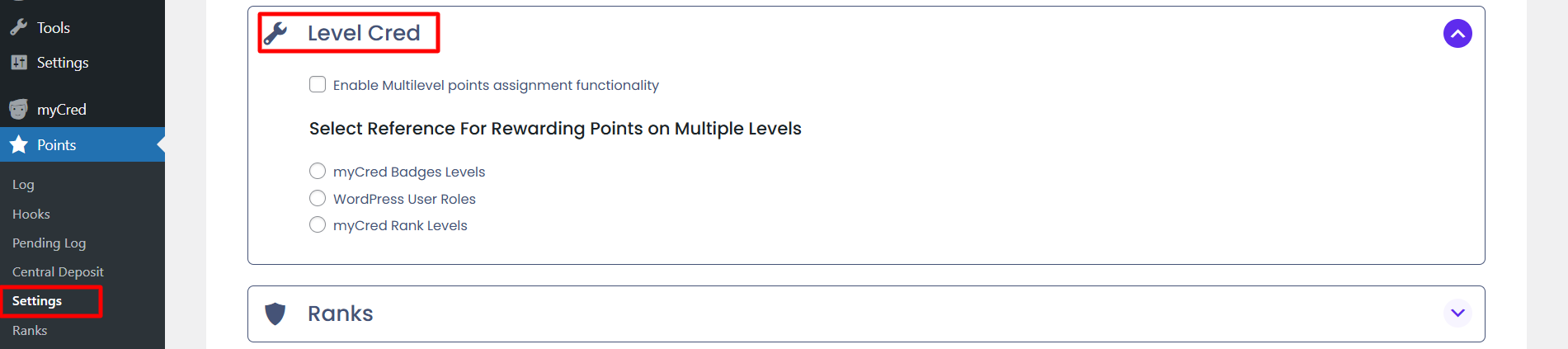
- This feature allows for assigning points across multiple levels, enabling a tiered rewards system for users.
- myCred Badges Levels: Points can be assigned according to the badge levels.
- WordPress User Roles: Points can be assigned based on the user roles within WordPress, allowing for different levels of rewards depending on the user’s role.
- myCred Rank Levels: Points can be linked to specific myCred rank levels, giving users rewards based on their rank progression.
- The system will prioritize points assignment according to the selected rank levels, ensuring that higher ranks receive higher priority in points distribution.