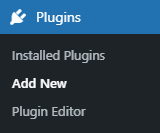
Installation Guide Estimated reading: 1 minute 2357 views Installation Guide Login to your WordPress Admin panel Navigate to the WordPress Admin Dashboard → Plugins → Add New. Click on the Upload Plugin button on the top left corner of your screen.Next, click the Choose file button in the box that appears below.Select the zip file that you have downloaded and upload it.Click on the Activate Plugin button.